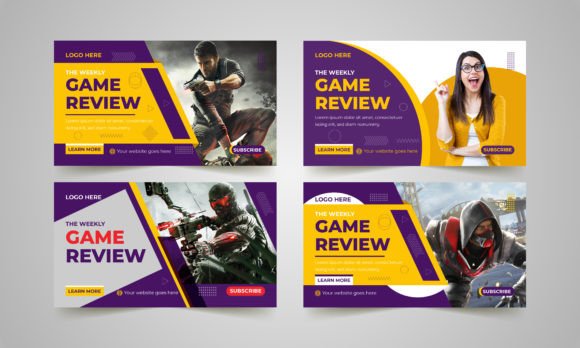
Game Review Video Thumbnail Design: A Key Element for YouTube Success
Creating engaging content is only half the battle for YouTubers. The other half lies in making that content discoverable and clickable. One of the most powerful tools in a content creator’s arsenal is a well-designed thumbnail. Specifically, Game Review Video Thumbnail Design plays a crucial role in how audiences perceive and interact with your videos.
With millions of videos uploaded daily, standing out on YouTube means more than just great gameplay or insightful commentary. It requires a strong visual identity, starting with the thumbnail. That’s where customizable templates come in — especially those designed for Adobe Illustrator CC.
Why Game Review Thumbnails Matter
A thumbnail is often the first interaction a viewer has with your content. It’s not just a picture — it’s a visual pitch. For game review creators, this means crafting a thumbnail that communicates the tone of your review, hints at the game’s style, and grabs attention in a split second.
- First impressions matter: A clean, professional thumbnail sets expectations before the viewer even clicks.
- Increases click-through rate (CTR): Eye-catching thumbnails can significantly boost the percentage of people who choose your video over others.
- Brand consistency: Using a consistent design across your thumbnails helps viewers recognize your content instantly.
When designed effectively, a thumbnail becomes part of your brand identity. This is especially true for creators who rely on recurring content like game reviews, where a recognizable visual style builds familiarity and trust.
Features of a High-Quality Thumbnail Template
Using a professionally designed template saves time and ensures quality. The right Game Review Video Thumbnail Design template should offer flexibility, clarity, and compatibility with modern design tools.
Fully Editable in Adobe Illustrator CC
Adobe Illustrator CC remains one of the top choices for professional designers. A template built for Illustrator allows for precise customization, vector scalability, and high-resolution output. This means you can resize your design without losing quality — a must for thumbnails that appear across different devices and screen sizes.
Standard Size: 1280×720 Pixels
YouTube recommends a 1280×720 pixel thumbnail size for optimal display. Templates built to this specification ensure your design looks sharp on both desktop and mobile platforms. It also aligns perfectly with YouTube’s suggested dimensions, preventing cropping or distortion.
RGB Color Mode for Web Optimization
Unlike print media, digital content uses RGB color profiles for accurate on-screen display. A thumbnail template designed in RGB ensures your colors remain vibrant and consistent across platforms and devices.
Well-Organized Layers and Structure
One of the biggest frustrations in editing templates is dealing with messy, disorganized layers. A quality Game Review Video Thumbnail Design template will feature clearly labeled layers, grouped elements, and intuitive layout guides. This makes it easy to swap out text, images, or icons without disrupting the overall design.
What’s Included in a Professional Thumbnail Template?
Knowing what you’re getting with a template helps set expectations and avoid surprises. Here’s a breakdown of what should be included when you purchase or download a thumbnail design template:
- EPS File (Adobe Illustrator CC Version): The main editable file, compatible with Illustrator for easy customization.
- Help File: Step-by-step instructions on how to use the template, including where to add text, images, and color adjustments.
- Fonts Download Link: Most templates use custom fonts, so a link to download them ensures your design looks as intended.
- Image Placeholders: Note that images are not included, but placeholders are provided so you can insert your own screenshots or artwork.
These features make the template accessible even to those with minimal design experience, while still offering depth for more advanced users.
How to Customize Your Game Review Thumbnail Template
Once you have your template, the next step is customization. Here’s how to make it work for your brand and content style:
Step 1: Choose the Right Game Artwork
Use high-quality screenshots or promotional images of the game you’re reviewing. Since the image isn’t included in the template, selecting the right visual is critical. It should be dynamic, relevant, and visually engaging.
Step 2: Add Your Text
Text should be concise and legible. Include the game title, your channel name, and a short tagline or hook. For example, “Is This Worth Playing?” or “Game Review: The Final Verdict.”
Step 3: Adjust Colors to Match Your Brand
If your channel uses a specific color scheme, tweak the template’s colors to reflect that. Consistency in color helps viewers identify your content at a glance.
Step 4: Add Icons or Graphics (Optional)
Some templates include optional design elements like stars, ratings, or game genre icons. These can add context and visual interest without cluttering the design.
Best Practices for Game Review Thumbnail Design
While templates provide a great foundation, understanding best practices ensures your thumbnails perform well:
- Use high contrast: Light text on a dark background (or vice versa) makes your text stand out.
- Keep it simple: Avoid overcrowding the design. Focus on one main message or image.
- Include your face (if applicable): Personal branding works — showing your face builds recognition and trust.
- Test different versions: Use YouTube’s A/B testing tools to see which thumbnails perform best.
Why Adobe Illustrator is the Preferred Tool
Many creators start with simpler tools like Canva or Photoshop, but Adobe Illustrator offers distinct advantages:
- Vector-based design: Unlike raster images, vector graphics scale without losing quality — perfect for thumbnails viewed on different screens.
- Professional-grade control: Illustrator offers precise alignment, typography tools, and layer management that are essential for clean, polished designs.
- Export flexibility: You can export your design in multiple formats (PNG, JPEG, SVG) for different platforms beyond YouTube.
If you’re serious about your YouTube branding, investing time in learning Illustrator or using a well-built template can make a big difference in your visual presence.
Real-World Use Cases for Game Review Thumbnails
Let’s look at a few scenarios where a solid thumbnail template makes an impact:
- Weekly review series: A consistent template lets viewers know when a new review drops, building anticipation and loyalty.
- Comparative reviews: If you’re comparing two games, using side-by-side layouts within the same template structure helps viewers instantly understand the format.
- Top lists or rankings: Templates can be adapted to include numbered lists or rating icons, making your thumbnails informative at a glance.
These examples show how adaptable a well-designed template can be across different types of game review content.
Choosing the Right Template for Your Channel
Not all thumbnail templates are created equal. When selecting a Game Review Video Thumbnail Design, consider the following factors:
- Design style: Choose a template that matches your channel’s aesthetic — whether it’s minimalist, bold, or cinematic.
- Customizability: Look for templates that allow easy editing of colors, fonts, and layout elements.
- Compatibility: Make sure the template is compatible with your design software — Adobe Illustrator CC is ideal for precision work.
- Support and documentation: A good help file or support system can make the difference between frustration and success.
Remember, the goal is not just to create a thumbnail — it’s to build a visual identity that enhances your content and connects with your audience.